Search results for uri活
uri活 community
One keyword maps to one global community path.
People
Not Found
Tweets including uri活

URI token is more than a project — it’s our proof that love, energy, and chaos can actually move the world. We’re still growing, we’re still shining, and we’re just getting started.
T1nEKn1kMyMKD5D4uvXe7VD5V86D9yu6NegK4xnBAGS
Show more

URI is still here, still shining, and still ours. I see you, I feel your energy, and I’m fighting with you every day. Let’s keep pushing and make everyone notice us. This is just the beginning 🔥
Show more

URI isn’t just a token — it’s our shared heartbeat of creativity and passion🌟
T1nEKn1kMyMKD5D4uvXe7VD5V86D9yu6NegK4xnBAGS

To my amazing uri community thank you for always staying by my side.
Your likes, comments, and kind words give me so much strength. Let’s keep creating a place together where we can smile, feel excited, and support each other. I’ll do my best for you, so stay close to me, okay?
Show more


New episode of The Future of Retail Investing & AI 🎙️
Julie talked with @TipRanks CEO Uri Gruenbaum and @LSEGplc 's Shrey Kohli about UK retail investing, the £600B sitting in cash accounts, and how AI (LSEG's MCP + TipRanks' Samuel AI) is reshaping how people invest.
Watch here:
Show more

This week, we visited @WiskAero for an inside look at its autonomous, all electric eVTOL air taxi. We spoke with CEO Sebastien Vigneron, Head of Product Design Uri Tzarnotzky, and VP of Autonomy Jon Lovegren about the design, passenger experience, and autonomy behind the aircraft.
Show more


🚨 Fundamental + Technical Analysis to Improve Your Portfolio's RANK: Webcast
📅 Aug 14, 2pm EST
🎙️ TipRanks CEO Uri Gruenbaum + Defiance Investments' Brendan Cavanaugh + VettaFi's Todd Rosenbluth
Register:
Show more

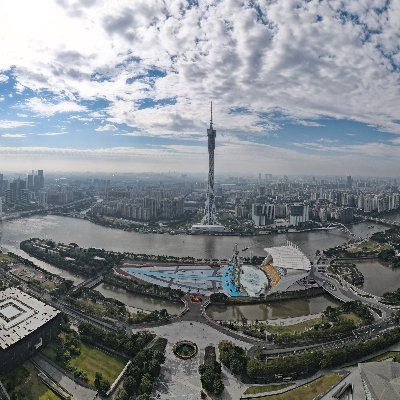
On the morning of June 24th, Chinese State Minister Li Qiang attended the opening ceremony and address of the 2026 Summer Davos Forum in Dalian. Bangladesh‘s List of heads of government of Guinea, Uri Ba, Kazakhstan’s Prime Minister Bektyenov, South Korea’s Prime Minister Kim Min-seok, Mongolia’s Prime Minister Uchirle, Montenegro’s Prime Minister Spaych, and about 1,800 representatives from around the world attended.
6月24日上午,中国国务院总理李强在大连出席2026年夏季达沃斯论坛开幕式并致辞。孟加拉国总理塔里克、几内亚总理乌里·巴、哈萨克斯坦总理别克捷诺夫、韩国总理金民锡、蒙古国总理乌其尔勒、黑山总理斯帕伊奇,以及约1800名全球各界代表出席。
#Davos# Forum
Show more


i've built a launchpad that powers $PONSION.
every token launched through it does two things at once:
> 70% of its trading fees are converted to ethereum:0x07f5b6823751c2e2cd4560f28af75ff887102241 and pushed straight to that token's holders. same machinery running on $PONSION today.
> 30% buys $PONSION on the open market and burns it. permanently. every token launched makes $PONSION supply smaller.
the contracts are live and verified. no owner, no admin function, nothing i can pause or redirect.
we're wiring it into the site now. until that, you can launch straight from the contract:
LAUNCHPAD contract:
0x6F8513Af95B30000e22C59936e930cd13DB181a3
go to the contract on the explorer, Write Contract tab, connect, call launch(). you pass name, ticker, logo (ipfs uri), description and socials. everything else is fixed by the contract.
it deploys your token AND its own distributor in one transaction. the fees are pointed at that distributor permanently.
the first one is already live: $GRANDKID
0x5a57AA711BD74fF03C228C1fa01f15c37f995944
and it works.
payout: 56 ethereum:0x07f5b6823751c2e2cd4560f28af75ff887102241 to 10 holders, 30% split off to the burn
burn: 181,696 $PONSION destroyed
check the supply yourself. it says 999,818,303 instead of 1,000,000,000.
$PONSION: 0x7a7ed21898ba3c211a3387f598955a2cb8ed3bad
$GRANDKID: 0x5a57aa711bd74ff03c228c1fa01f15c37f995944
Show more
